How to Detect AI Agents Like OpenClaw Visiting Your Website
AI agents like OpenClaw send Accept: text/markdown - a header no browser uses. Learn how to detect agent traffic on Vercel, Cloudflare, Nginx, and more.

At Sitefire, we monitor how brands appear in AI search answers across ChatGPT, Gemini, and Perplexity. But AI search is only half the picture. AI agents also browse websites directly, fetching pages and extracting content - often without leaving a trace in standard analytics. They do leave one signa
At Sitefire, we monitor how brands appear in AI search answers across ChatGPT, Gemini, and Perplexity. But AI search is only half the picture. AI agents also browse websites directly, fetching pages and extracting content - often without leaving a trace in standard analytics. They do leave one signal: a single HTTP header that no human browser ever sends.
This article covers what that header is, why agents send it, and how to capture it on Vercel with 15 lines of Next.js middleware. We also cover what works on other platforms like Cloudflare, AWS CloudFront, and Nginx.
How do AI agents access your website?
AI agents access websites through three tools - web search APIs, direct HTTP fetch, and browser automation - but only two of them hit your server directly.
| Tool | How it works | Hits your server? | Detectable via Accept header? |
|---|---|---|---|
| Web Search (e.g. Brave API) | Queries a search index. Returns titles, URLs, snippets. | No - queries a pre-built index | N/A |
| Web Fetch | Direct HTTP request. Downloads HTML, converts to markdown. | Yes | Yes |
| Browser (Playwright/Chromium) | Launches a full browser. Renders JavaScript, handles SPAs. | Yes | No - sends standard Chrome headers |
The typical flow: an agent searches for relevant URLs, then fetches the most promising ones with Web Fetch to read the content. The browser tool is reserved for JavaScript-heavy pages that require rendering - it is expensive and slow.
Web Fetch is the common path. And it is the one that leaves a detectable fingerprint.
What makes AI agent requests different?
AI agent fetch requests include text/markdown in the HTTP Accept header - a content type that no human browser ever requests.
When a browser requests a page, it sends an Accept header like
text/html,application/xhtml+xml,application/xml;q=0.9,*/*;q=0.8.
When OpenClaw's Web Fetch requests the same page, it sends
Accept: text/markdown, text/html;q=0.9, */*;q=0.1.
The difference: text/markdown. No human browser requests markdown.
This is HTTP content negotiation, defined in RFC 7231. The q= values are quality factors between 0 and 1, expressing the client's preference order. Markdown gets the implicit q=1.0 (highest priority), HTML gets q=0.9, everything else gets q=0.1.
Why do agents prefer markdown? Efficiency. Cloudflare measured an 80% token reduction when serving markdown instead of HTML on their blog - from 16,180 tokens down to 3,150. A typical HTML page includes navigation, footers, scripts, and styling - noise that an AI model does not need. Fewer tokens means faster processing, lower cost, and better results. This matters for AI visibility too: at Sitefire, we see that cleaner content formats lead to more accurate AI citations.
This efficiency gain is why Cloudflare built "Markdown for Agents" - a managed transform rule that detects Accept: text/markdown and converts HTML to markdown at the edge. OpenClaw added markdown support in its Accept header (PR #15376, merged February 2026) to take advantage of this convention.
Which agents send this header - and can you tell them apart?
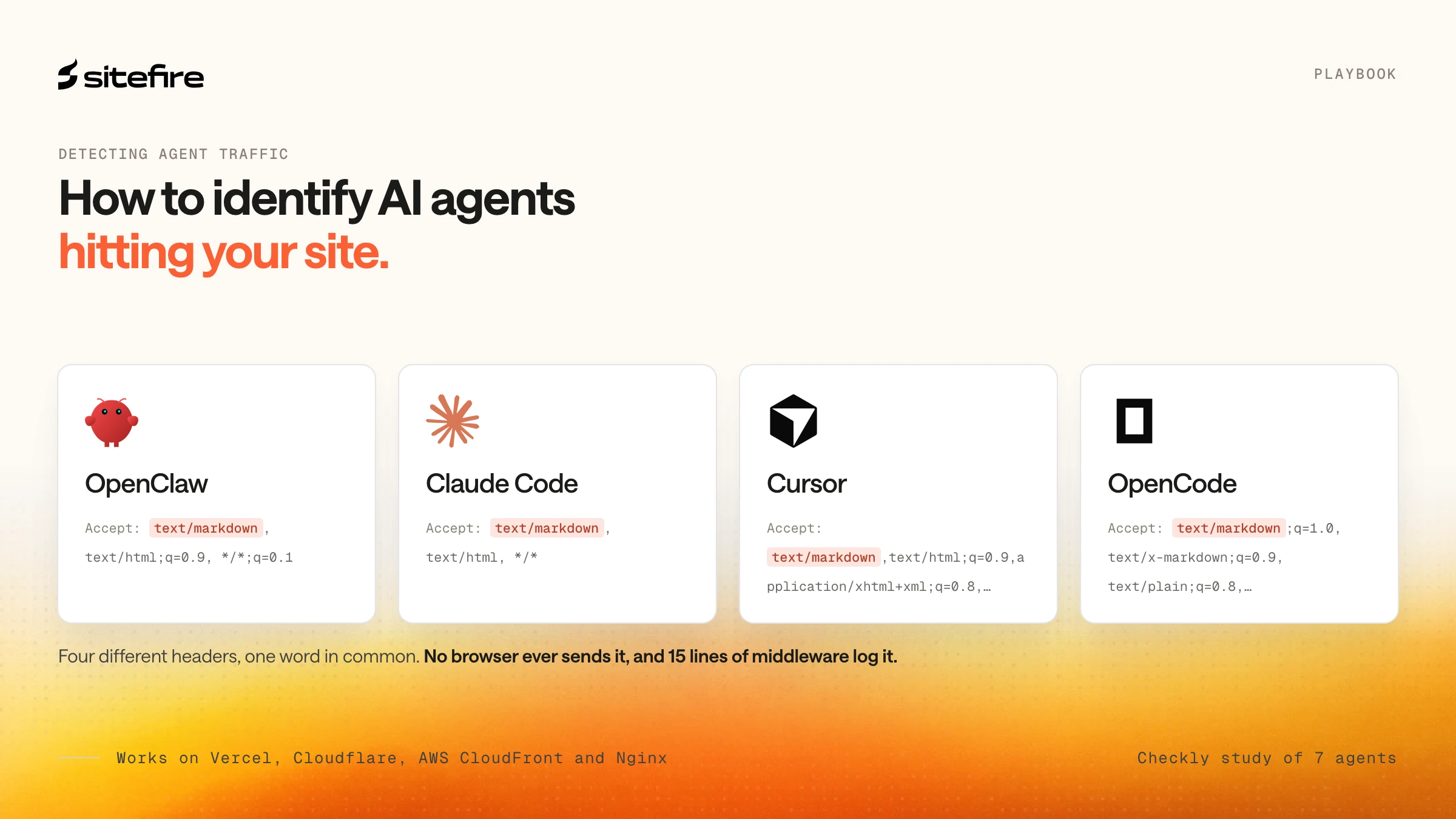
Four of seven major AI agents request text/markdown in their Accept header, but the header alone cannot reliably identify which specific agent is visiting.
Based on Checkly's empirical study of seven AI agents and OpenClaw's public GitHub history, here is what we know:
Agents that requesttext/markdown :
| Agent | Exact Accept header | Source |
|---|---|---|
| OpenClaw | text/markdown, text/html;q=0.9, */*;q=0.1 | GitHub PR #15376 |
| Claude Code v2.1.38 | text/markdown, text/html, */* | Checkly |
| Cursor 2.4.28 | text/markdown,text/html;q=0.9,application/xhtml+xml;q=0.8,application/xml;q=0.7,image/webp;q=0.6,*/*;q=0.5 | Checkly |
| OpenCode 1.2.5 | text/markdown;q=1.0, text/x-markdown;q=0.9, text/plain;q=0.8, text/html;q=0.7, */*;q=0.1 | Checkly |
Agents that do NOT requesttext/markdown :
| Agent | Accept header | Source |
|---|---|---|
| OpenAI Codex | Standard browser-like Accept | Checkly |
| Gemini CLI 0.28.2 | */* | Checkly |
| Windsurf 1.9552.21 | */* | Checkly |
The presence of text/markdown in any Accept header proves the request came from an AI agent or bot. No browser sends it.
Can you identify which specific agent is visiting? The header strings are currently different - OpenClaw uses explicit quality factors, Claude Code omits them, Cursor includes additional media types. But these are implementation details, not stable APIs. They can change with any release, and there is no guarantee that two agents will not converge on the same string in the future. Treat the Accept header as a reliable signal for class (AI agent vs. browser), not as a fingerprint for a specific agent.
The User-Agent header is even less useful for this purpose. Claude Code sends axios/1.8.4 (a generic HTTP library default). OpenClaw's Web Fetch sends a Chrome-like UA string. Neither identifies itself as an AI agent in the User-Agent.
Why don't default server logs show this?
Most web platforms omit the Accept header from default access logs, making AI agent traffic invisible without custom configuration.
Vercel's network logs record a fixed set of fields: path, host, user agent, status code, cache status. The Accept header is not among them. The Vercel CLI (vercel logs) surfaces the same limited data.
This is not a Vercel-specific problem:
| Platform | Accept in default logs? | How to access it |
|---|---|---|
| Vercel | No | Edge middleware (console.log) |
| Cloudflare | No | WAF Custom Rules (Pro+), Workers, or Logpush Custom Fields (Enterprise) |
| AWS CloudFront | No (standard/v2 logs) | Real-time logs via Kinesis (cs-accept field) |
| Netlify | No | Edge Functions |
| Nginx | No | Add $http_accept to log format |
| Apache | No | Add %{Accept}i to log format |
Until AI agents made it the primary signal distinguishing bots from browsers, the Accept header was not considered important enough to log.
How to detect agent traffic on Vercel
Next.js middleware runs before every matched request - including requests served from Vercel's CDN cache. This is the key architectural detail. API routes and server components only execute on cache misses. Middleware runs on every request, which means it catches every agent visit regardless of caching.
Middleware executes on Vercel's Edge Runtime, a V8-based environment deployed close to the incoming request. It adds roughly 1-5ms of latency.
Create src/middleware.ts in your Next.js project (or middleware.ts at the root if you don't use a src directory):
import { NextResponse } from "next/server";
import type { NextRequest } from "next/server";
export function middleware(request: NextRequest) {
const accept = request.headers.get("accept");
const ua = request.headers.get("user-agent");
console.log(
[middleware] ${request.method} ${request.nextUrl.pathname} | Accept: ${accept} | UA: ${ua}
);
return NextResponse.next();
}
export const config = {
matcher: ["/", "/api/:path*"],
};
The matcher limits which routes trigger the middleware. Without it, every static asset request (JS bundles, CSS, images, fonts) fires a log line. Scope it to the routes you care about.
Deploy by pushing to your connected Git branch. Vercel auto-deploys on push. We deployed this middleware on map.sitefire.ai and confirmed the results below.
How to read the results
In your Vercel dashboard, navigate to Logs. Under Resource in the filter sidebar, check the Middleware box. When an AI agent visits, you will see entries like [middleware] GET / | Accept: text/markdown, text/html;q=0.9, */*;q=0.1 | UA: Mozilla/5.0 ...
The text/markdown in the Accept header confirms this is an AI agent, not a browser.
Requests from Playwright-based browser tools will look like standard Chrome traffic - they use a real Chromium instance. The Accept header will not catch these. In practice, most AI agent traffic uses the lightweight fetch path because the browser tool is expensive and slow.
Middleware counts toward Vercel's function invocation quota on the Hobby plan. On high-traffic sites, scope the matcher tightly or monitor usage.
Key Takeaways
-
AI agents using Web Fetch send
Accept: text/markdownin HTTP requests - a content type no browser ever sends. -
Four of seven major agents (OpenClaw, Claude Code, Cursor, OpenCode) request markdown. Three (Gemini CLI, Windsurf, OpenAI Codex) do not.
-
No major web platform (Vercel, Cloudflare, AWS CloudFront, Nginx) logs the Accept header by default. Agent traffic is invisible without custom logging.
-
On Vercel, 15 lines of Next.js middleware capture the Accept header on every request, including CDN cache hits. Sitefire verified this on its own deployment.
-
The Accept header identifies agent traffic as a class, but cannot reliably fingerprint a specific agent - header strings change between releases.
-
Browser-based agents (Playwright/Chromium) send standard Chrome headers and remain undetectable by this method.
The Bottom Line
Detecting AI agent traffic today comes down to one signal: text/markdown in the HTTP Accept header. It is functionally meaningful (agents genuinely prefer markdown for efficiency), absent from all normal browser traffic, and harder to spoof than a User-Agent string because it serves a real purpose in content negotiation.
On Vercel, the middleware approach shown here fills the gap in 15 lines of code. On Cloudflare, a WAF Custom Rule matching http.request.headers["accept"] containing text/markdown can flag these requests at the edge (Pro plan and above). On Nginx and Apache, adding the Accept header to the log format is a one-line configuration change. On AWS CloudFront, real-time logs include the cs-accept field, though they require a Kinesis Data Streams setup.
This method has clear limits. It catches agents that use lightweight HTTP fetching - OpenClaw, Claude Code, Cursor, OpenCode - but not agents that use full browser automation, agents that do not request markdown (Gemini CLI, Windsurf, OpenAI Codex), or agents that deliberately omit the header. The Accept header strings are also implementation details that can change with any release.
But right now, Accept: text/markdown is the best signal available. For most websites, it is the only way to see AI agent traffic that would otherwise be invisible in standard logs. At Sitefire, we see this as one piece of a larger shift: AI is changing how content gets discovered, consumed, and cited - and understanding which agents read your pages is the first step toward optimizing for them.
Frequently Asked Questions
Can AI agents avoid detection by not sending text/markdown?
Yes. Agents using browser automation (Playwright) send standard Chrome headers and are indistinguishable from human traffic. Agents like Gemini CLI and Windsurf already skip text/markdown. This method detects agents that use lightweight HTTP fetch - the most common path - but not all agent traffic.
Does Cloudflare's "Markdown for Agents" feature help with detection?
Cloudflare's managed transform serves markdown to requests that include text/markdown in the Accept header, but it does not log or flag those requests. You still need a WAF Custom Rule (Pro plan or above) or a Cloudflare Worker to track agent visits separately.
How much latency does the Vercel middleware add?
Roughly 1-5ms per matched request. The middleware runs on Vercel's Edge Runtime, a V8-based environment deployed close to the incoming request. For most websites, this overhead is negligible. Use the matcher config to limit which routes trigger the middleware and keep invocation counts low.
Will the Accept header signal keep working as agents evolve?
The signal works because agents have a functional reason to request markdown - it reduces tokens by up to 80%. Unlike User-Agent strings, which carry no optimization benefit, the Accept header serves a real purpose. As long as markdown remains more efficient for AI models to process, agents will keep requesting it.
Sources: